Subdomain Recon

A subdomain is a subdivision of a domain name in the Domain Name System (DNS) hierarchy. Subdomain recon involves identifying and enumerating subdomains associated with a target domain. By discovering subdomains, testers can expand the attack surface and uncover hidden assets, increasing the likelihood of finding vulnerabilities.
Discovering Subdomains - Passive
The passive discovery of a target’s subdomains relies on publicly available information. An excellent source of data for discovering subdomains is SSL certificates. I detail some good methods to obtain SSL certificate data here.
Google Dorking is a great method for discovering subdomains for a target. You can use the site: operator to filter results for the given domain in Google search.
site:*.hacker.com # Using the site: operator to Google search all indexed subdomains for the target domaincrt.sh can be used to extract subdomains for a target. It aggregates data from Certificate Transparency (CT) logs, which are publicly accessible records of SSL/TLS certificates issued by certificate authorities (CAs).
curl -k -s "https://crt.sh/?q=pentesting.site&output=json" | jq -r '.[] | "\(.name_value)\n\(.common_name)"' | sort -u # Extracts subdomains for a target domain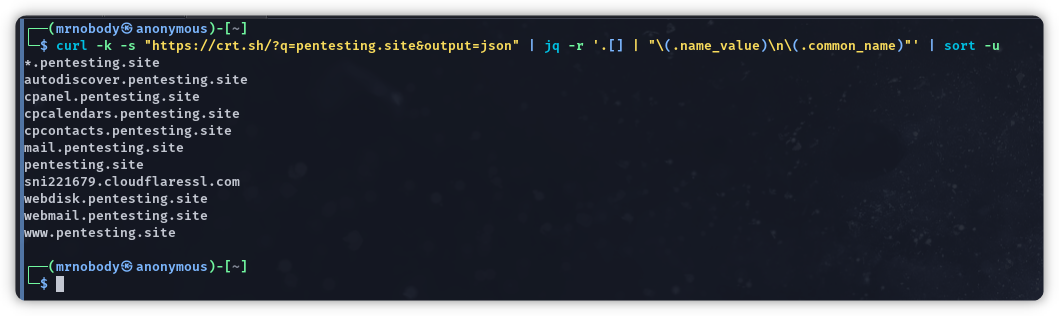
subfinder is a subdomain discovery tool that returns valid subdomains for websites, using passive online sources. It is an excellent tool from ProjectDiscovery and can be found here: https://github.com/projectdiscovery/subfinder. There are several services that require API keys and are worth setting up.
subfinder -silent -all -d hacker.com # Use all sources for enumeration of subdomainsSublist3r is a Python tool designed to enumerate subdomains of websites using OSINT. It can be found here: https://github.com/aboul3la/Sublist3r.
python3 ./sublist3r.py -d hacker.com # Search for subdomains using Google, Yahoo, Bing, Baidu and Ask etc.Knockpy is a portable and modular Python3 tool designed to enumerate subdomains on a target domain through passive reconnaissance. It can be downloaded here: https://github.com/guelfoweb/knock.
knockpy -d hacker.com --recon # Perform subdomain reconnaissance on the target domain
Discovering Subdomains - Active
Active subdomain discovery for a target involves actively probing a target domain’s infrastructure to identify subdomains. Your first direct interaction should always be to attempt a Zone Transfer on a target’s DNS server (if they have one). If a Zone Transfer is successful, there’s no need to continue the subdomain enumeration process as a successful zone transfer would result in having ALL domain information for the target.
The following are two methods of DNS Zone Transfer using nslookup and dig.
nslookup -type=NS hacker.com # Identify the name server(s) of the target domainnslookup -type=any -query=AXFR hacker.com nameserver.net # Perform an Authoritative Transfer for the target domain and nameserver
dig @nameserver.net hacker.com AXFR # Attempt a zone transfer using digIf a DNS zone transfer is unsuccessful the next most effective active subdomain discovery activity is Subdomain Brute Forcing. This involves tools and techniques that use all possible combinations of words, alphabets, and numbers before the main domain to get a subdomain that resolves to an IP address.
Many tools can be used, starting with a basic bash script and the Linux built-in host application. The following takes a list of possible subdomains, appends it to the root domain and attempts to resolve it. If it resolves to an IP address you have discovered a valid subdomain.
#!/bin/bash
if [ "$1" == "" ]; then echo "Usage: ./subdomains.sh [domain]" echo "Example: ./subdomains.sh mydomain.com"else for domain in $(cat subdomains.txt); do host $domain.$1 | grep "has address\|is an alias for" donefiSome good lists for subdomain brute forcing tools:
The OWASP Amass Project performs network mapping of attack surfaces and external asset discovery using open-source information gathering and active reconnaissance techniques. It can be used for brute forcing subdomains.
amass enum -brute -w all.txt -d hacker.com # Perform brute force subdomain enumeration of the target domainamass enum -brute -alts -w all.txt -d hacker.com # Perform brute force subdomain enumeration with generation of altered names enabledgobuster is also a great tool to brute force subdomains. You can find the tool here: https://github.com/OJ/gobuster.
gobuster dns -t 30 -w all.txt -d hacker.com # DNS subdomain enumeration mode to brute force target domaingobuster dns -t 30 -w all.txt -d hacker.com -i # DNS subdomain enumeration mode and output IP addresses of subdomainsshuffledns from ProjectDiscovery supports subdomain brute forcing of a target with a given wordlist. It requires massdns to be installed. shuffledns is available to download here: https://github.com/projectdiscovery/shuffledns.
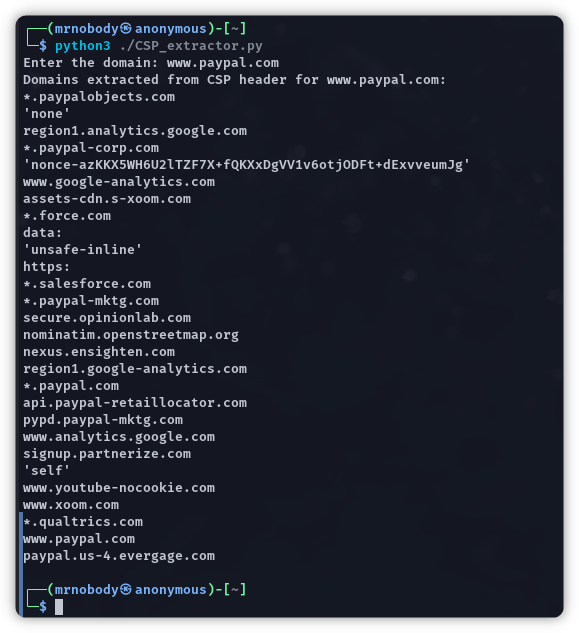
shuffledns -d hacker.com -w all.txt -r resolvers.txt -mode bruteforce # Subdomain brute force of a target domain. The resolvers.txt must contain DNS resolvers such as 8.8.8.8 and 1.1.1.1The HTTP Content Security Policy (CSP) response header is a header that tells the browser from what sources it is allowed to include and execute resources. There are often useful subdomains added to the CSP response header. The following is a short Python3 script that you can use and build on to extract the CSP header of a target domain.
import reimport requestsfrom urllib.parse import urlparse
def extract_domains(csp_header): domains = set() directives = csp_header.split(';') for directive in directives: parts = directive.split() if len(parts) > 1: for part in parts[1:]: if part.startswith(('http://', 'https://')): domain = urlparse(part).netloc domains.add(domain) else: domains.add(part) return domains
def get_csp_header(domain): headers = { 'User-Agent': 'Mozilla/5.0 (Windows NT 10.0; Win64; x64) AppleWebKit/537.36 (KHTML, like Gecko) Chrome/114.0.0.0 Safari/537.36' } try: response = requests.get(f'https://{domain}', headers=headers) csp_header = response.headers.get('Content-Security-Policy', '') return csp_header except requests.exceptions.RequestException as e: print(f"An error occurred: {e}") return ''
# Get user input for the domaindomain = input("Enter domain: <tesla.com> ")
# Fetch the CSP header for the given domaincsp_header = get_csp_header(domain)
# Extract domains from the CSP headerif csp_header: domains = extract_domains(csp_header) print(f"Domains extracted from CSP header for {domain}:") for d in domains: print(d)else: print(f"No CSP header found for {domain}")The script output will look like the below.